

Get started
Build a full app
A complete Google ADK app that answers leadership questions from company data and makes the quarterly business review as a checked PowerPoint deck and Excel workbook.
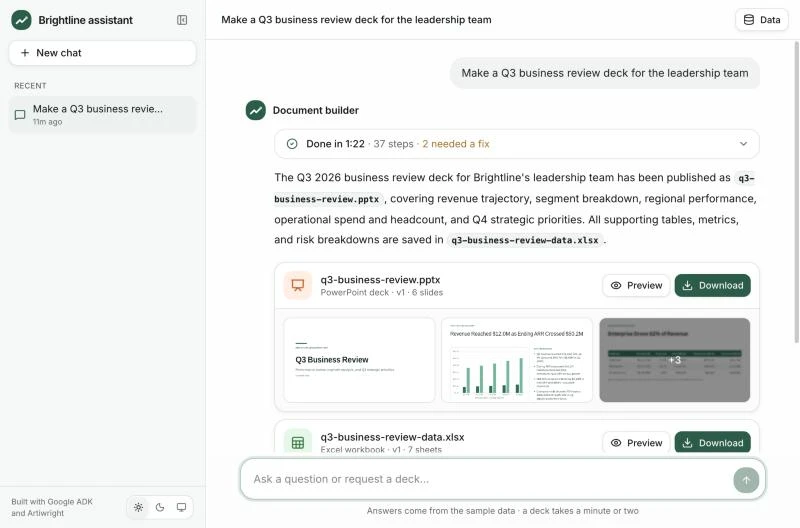
In this tutorial you run a complete app: a web app, ADK’s API, and a team of Google ADK agents working on a company’s data. Ask a question and the analyst answers with the figures. Ask for the quarterly business review and you get a native PowerPoint deck and the Excel workbook behind it, checked so that every number on a slide is in the workbook, in two to three minutes. Then you’ll see how the pieces fit, so you can add Artiwright to your own agents the same way.
Time: about 15 minutes. You need: Git, Python 3.11 or newer with uv, Node.js 22.13 or newer for the web app, and an OpenAI API key, a Gemini API key or a Google Cloud project with Vertex AI (prerequisites). No key yet? The app also runs with a scripted model.
What you’ll build
Section titled “What you’ll build”The app is the assistant of Brightline, a made-up software company. Its data is what its systems would export: 24 months of revenue by segment and region, 186 customer accounts, 260 sales opportunities and monthly headcount, as CSV files, plus the leadership team’s notes: the Q3 board update, the Q4 plan, customer call notes and the competitive landscape.
- The assistant reads each message and hands it to the right agent.
- The analyst answers questions with SQL over the data and a search of the notes, and says where each figure came from.
- The report builder runs two agents in order. The brief writer saves every table the document needs straight from SQL and writes a short brief. the Artiwright agent loads those tables into a workbook, builds the deck from them, looks at every slide, and finalizes both files.
- The editor is another Artiwright agent: it changes a deck made earlier in the chat and saves the next version.
Run it
Section titled “Run it”-
Get the code and open the example:
git clone https://github.com/bvenu17/artiwright.gitcd artiwright/examples/business-review-appDirectoryapp/
- agent.py the agent team
- prompts.py the agents’ instructions
- tools.py SQL over the data, the notes search, save_table
- fast_api_app.py ADK’s API, plus downloads and previews
- demo.py the scripted model for runs without a key
Directoryfrontend/ the web app (React, Vite, Tailwind, shadcn/ui)
- …
Directorydata/ the CSV exports and notes
- …
Directorytests/ the whole app, end to end, without a key
- …
- Makefile
- .env.example
-
Install the Python and web app packages:
make installuv syncnpm --prefix frontend ciThis installs Artiwright with Google ADK. Artiwright brings its own runtime, so the API needs nothing else.
-
Choose a model. Copy the example settings into
.env:cp .env.example .env.env OPENAI_API_KEY=your-keyGet a key from the OpenAI platform. The app uses
openai/gpt-6.1-sol..env MODEL_NAME=gemini-3.8-flashGOOGLE_API_KEY=your-keyGet a key from Google AI Studio.
.env MODEL_NAME=gemini-3.8-flashGOOGLE_GENAI_USE_VERTEXAI=TRUEGOOGLE_CLOUD_PROJECT=your-project-idGOOGLE_CLOUD_LOCATION=globalSign in first with
gcloud auth application-default login..env MODEL_NAME=demoA scripted model stands in for the real one. The tools, Artiwright and the API all run for real; a deck takes seconds.
The app uses
openai/gpt-6.1-solunless you setMODEL_NAME; other providers work through LiteLLM (see choosing a model). -
Start it:
make devIn two terminals:
uv run uvicorn app.fast_api_app:app --port 8000npm --prefix frontend run dev -
Open http://localhost:5173 and try the suggestions:
- “Which renewals are at risk before the end of the year, and why?” The analyst answers from the CRM and the call notes, with a table and where the figures came from.
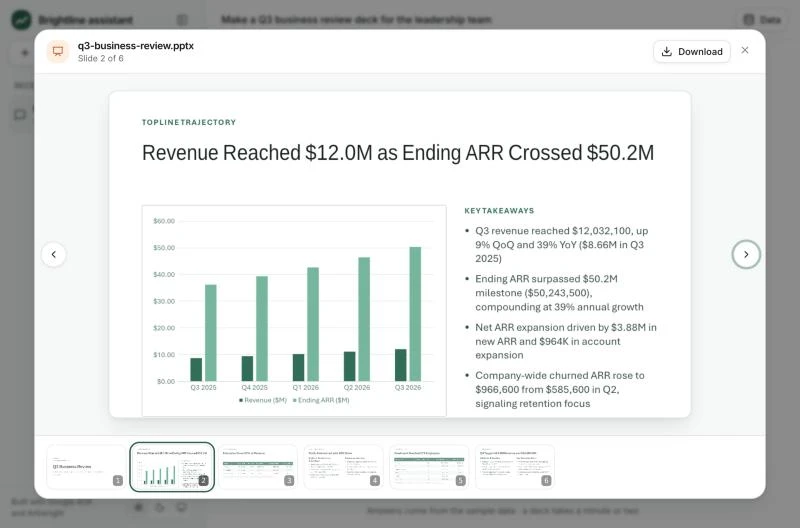
- “Make a Q3 business review deck for the leadership team.” The timeline shows each step as it happens: the tables the brief writer saves, loading them into the workbook, building and checking the slides. Then the deck and the workbook appear with previews and a download.
Open the deck in PowerPoint and click a chart: its numbers are in an editable sheet. Ask “make slide 3 a bar chart” and the editor saves a new version.
How it works
Section titled “How it works”The agent team
Section titled “The agent team”Everything about the agents is in app/agent.py. The analyst and the brief writer are ordinary ADK agents with
plain Python tools. The Artiwright agent and the editor come from artiwright_agent(), with the app’s
theme and instructions:
report_builder = SequentialAgent(    name="report_builder",    description="Makes PowerPoint decks and Excel workbooks from Brightline's data: a brief, then the files.",    sub_agents=[        analyst("brief_writer", prompts.BRIEF_WRITER, "Gathers the figures and facts for a document.",                [save_table, query_data, search_notes]),        documents("artiwright_agent", "Builds the deck and its workbook from the brief, checks and saves them.",                  prompts.DOCUMENTS),    ],)
root_agent = LlmAgent(    name="assistant",    model=MODEL,    instruction=prompts.ASSISTANT,    sub_agents=[        analyst("analyst", prompts.ANALYST, "Answers questions from Brightline's data and notes."),        report_builder,        documents("editor", "Changes a deck or workbook already made in this chat.", prompts.EDITOR),    ],)
artiwright_agent() brings Artiwright’s tools, the guide that teaches the model to build, look, check and save,
and callbacks that save each finished file as an ADK artifact. Each agent hands control back when it’s done, so
the assistant routes every new message.
Numbers that come from the data
Section titled “Numbers that come from the data”The brief writer doesn’t copy figures into the brief. It calls save_table for every chart and table the
document needs, and for the single figures in a “Key figures” table:
def save_table(name: str, sql: str, tool_context: ToolContext) -> dict[str, Any]: """Runs one read-only SQL query and saves the result as a table for the document: the document agent loads it into the workbook by its path, so the deck's figures come straight from the query."""The Artiwright agent imports each table into the workbook with artiwright_import, builds the deck from them, and
finalizes both. Finalize checks the deck’s numbers
against the workbook, so a slide that quotes a figure the data doesn’t hold isn’t saved: the agent fixes it first.
The server
Section titled “The server”app/fast_api_app.py is ADK’s own API server, from get_fast_api_app(): sessions, /run_sse for streaming a
turn, and artifacts, kept on disk so chats and files survive a restart. The app adds three routes: the datasets,
file downloads, and page previews that Artiwright renders.
app = get_fast_api_app(agents_dir=str(ROOT), web=False, allow_origins=["http://localhost:5173"])The web app
Section titled “The web app”frontend/ is React, Vite, Tailwind and shadcn/ui, the same stack as Google’s ADK samples. It sends each message
to /run_sse and turns the stream of ADK events into the timeline: a plain-language line per tool call, the agent
that made it, and the time. When a file arrives it shows a card with previews and a download.
Make it yours
Section titled “Make it yours”- Your data: replace the queries and search in
app/tools.pywith calls to your warehouse, semantic layer or vector store. Keepsave_table, so finalize can check the deck against the data. - Your brand: set
ARTIWRIGHT_THEMEin.envto a preset (ledger,studio,coast) or the path of your company template (.potx). See themes and templates. - Your documents: change the instructions in
app/prompts.pyfor board decks, pipeline reviews or monthly reports. - Deploy: the Dockerfile builds the web app and serves everything on port 8080, ready for Cloud Run. For production, point ADK at a database session service and a Cloud Storage artifact service.
Troubleshooting
Section titled “Troubleshooting”The page says it can’t reach the server
The API isn’t running on port 8000, or it stopped with an error. Check the terminal where make dev runs; a
missing model setting shows there first.
The first deck takes longer
The first request after starting the server waits while Artiwright starts. Later decks start right away.
A step timed out or failed
Retry from the page. MODEL_TIMEOUT in .env sets how long a model call may take (120 seconds by default).